
A family organization app keeps what a household juggles in one place everyone can open: the calendar, the shopping list, the chores and, in some apps, where everyone is. Choosing one is harder than it sounds. Some only do the calendar, some charge each family member separately, and some only work if everyone has an iPhone. We compared six apps that families in the US can use in 2026 on what parents ask about most: which phones they run on, what the free plan really includes, what the paid plan costs, and the catch.
We make Orbit, one of the six, so it's first on the list. Everything about the other apps comes from their own websites, help pages and App Store listings, checked in October 2026 and linked below, and we're just as plain about where Orbit falls short.
The best family organization apps at a glance
| App | Works on | Free plan | Paid plan (US) | Best for |
|---|---|---|---|---|
| Orbit | iPhone, Android | Live map, chat and SOS for two people | Orbit Plus, priced in the App Store and Google Play | One app for the family's plans and the family map |
| Cozi | iPhone, Android, web | Calendar, lists and recipes, with ads | Gold $39 a year, Max $79 a year | A shared calendar with meal planning |
| FamilyWall | iPhone, Android, web | Calendar, lists and a family messenger | Premium $44.99 a year | The most features, with location as a paid extra |
| TimeTree | iPhone, Android, web | Shared calendars, with ads | Premium $4.49 a month or $44.99 a year, per person | A free shared calendar and nothing else |
| Google family calendar | Android, iPhone, computer | A family calendar, notes and shopping lists | None needed | Families of up to six who use Google |
| Apple Family Sharing | iPhone, iPad, Mac | Shared calendars, Reminders lists and Find My | None needed | Families where everyone has an iPhone |
What a family organization app should do
Before comparing apps, it helps to write down what your family actually needs. These are the things worth checking:
- It runs on every phone in the family. If one person carries an Android phone, an Apple-only setup leaves them out. Check this first, because it rules out the most options.
- One shared calendar that everyone can see and add to, with repeating events, such as practice every Tuesday, and alerts before things start.
- Shared lists for groceries and to-dos that update on everyone's phone.
- Chores, if your kids are old enough, ideally with points or money to earn.
- One price for the family. Some apps charge each person who wants the paid features.
- Kids' accounts that make sense. A child should see their own schedule without being able to wipe out everyone else's.
Meal planning, a family chat and location sharing are extras. Decide whether you want them before you compare prices, because they're often what the paid plan is selling.
The six apps, compared
Orbit
Best for: families with both iPhones and Android phones who want the family planner and the family map in one app.
Orbit is our app. It runs on iPhone (iOS 16 or later) and Android (8.0 or later), and everyone joins one family from an invite.
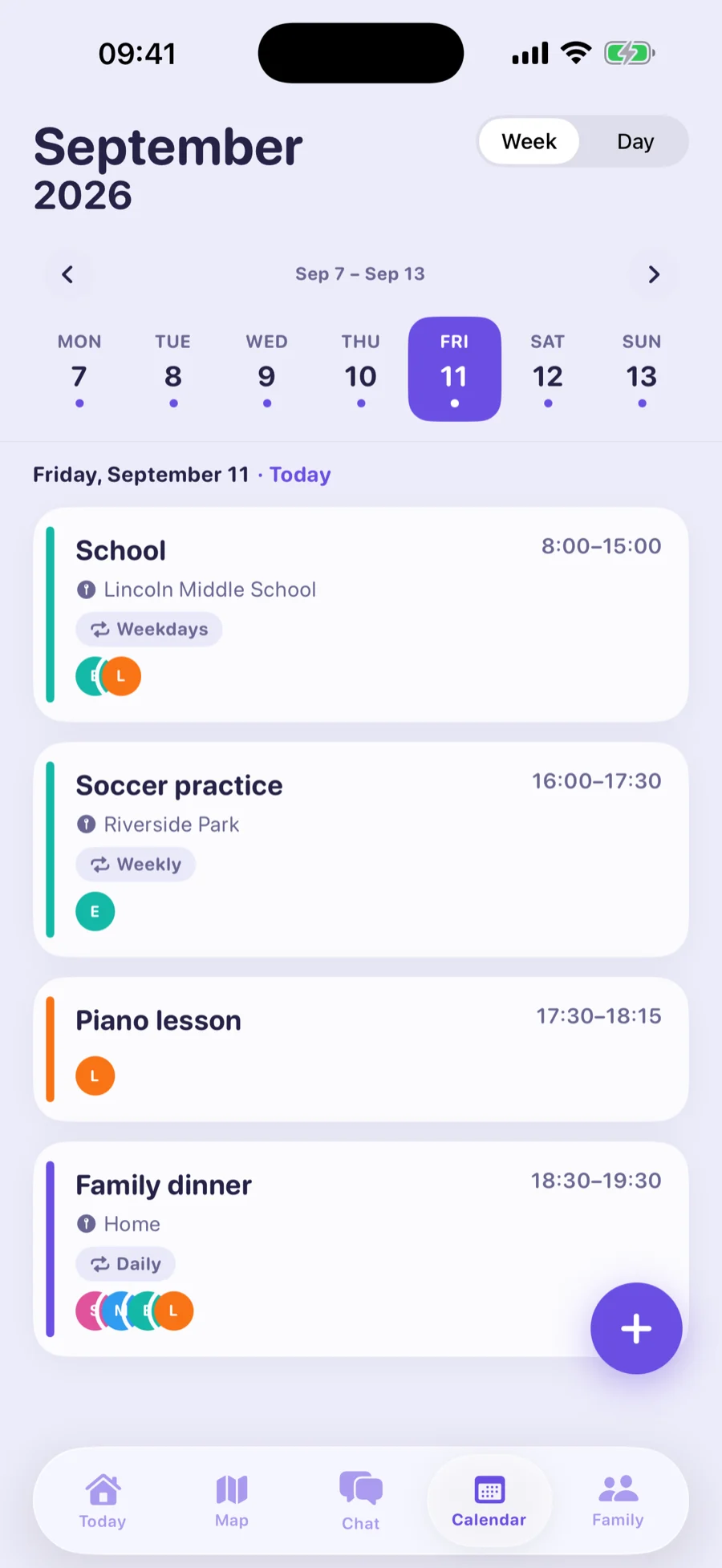
- Calendar: events for one person or the whole family, repeats such as "every other Tuesday", and up to five alerts per event. Each person can also bring in the calendars already on their phone, from iCloud, Google or Outlook, and Orbit keeps those events up to date. See the family calendar.
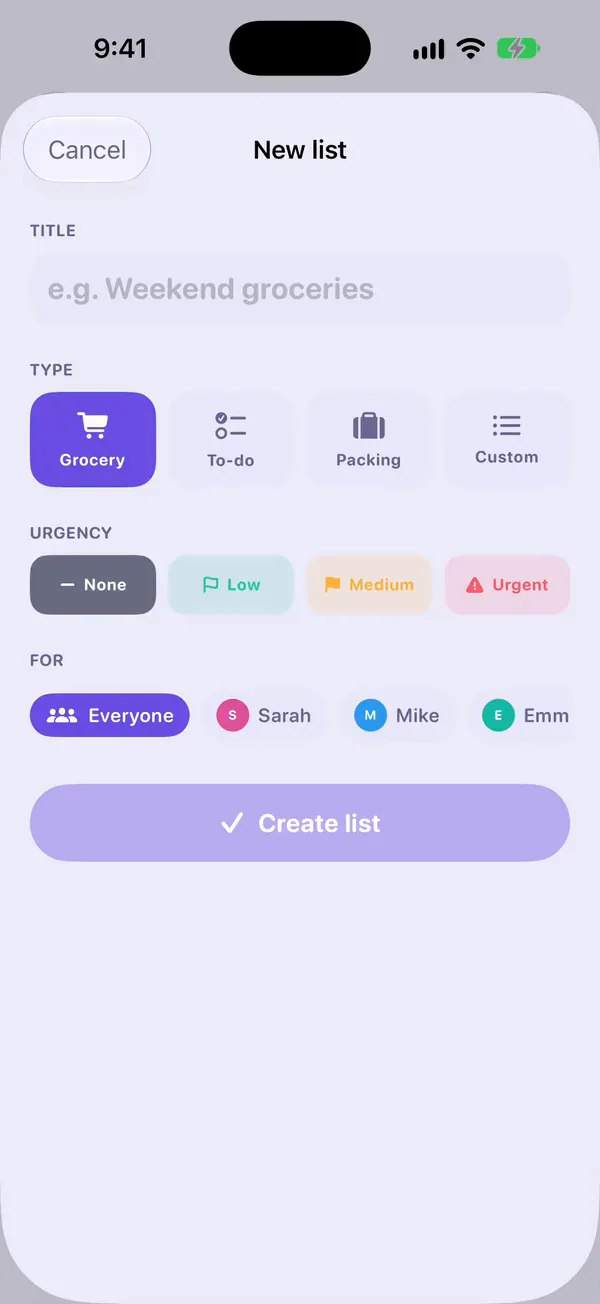
- Lists: grocery, to-do, packing and custom lists, shared with everyone or just a few people, showing who ticked each item. See shared lists.
- Chores: points and a money reward for each chore. Your child marks it done and you approve it. See chores and allowance.
- Reminders: right away, at a set time, or when someone arrives at or leaves a saved place, such as "Take your PE kit" as they leave home.
- Location: the live family map, alerts when someone arrives at a saved place, and an SOS button.
- Chat: one end-to-end encrypted family chat, with voice notes.
Free plan: the live map, family chat and SOS, free forever for the family organizer and their first child.
Paid plan: Orbit Plus adds more family members, the calendar, lists, chores, reminders, saved places and location history. Prices are shown in the App Store and Google Play.
The catch: the free plan covers two people and none of the planning tools, so using Orbit as a family organizer means Orbit Plus. It's phone-only, with no website or desktop app. It reads your Google or iCloud calendar but doesn't write back to it. There's no meal planner or recipe box.
Cozi Family Organizer
Best for: families who mainly want a shared calendar and lists, with recipes and meal planning on top.
Cozi runs on iPhone, Android and the web. The free plan has a shared calendar, shopping and to-do lists and a recipe library, and Cozi's FAQ says the free version is supported by ads and sponsors.
Paid plans: according to Cozi's plan page, Gold costs $39 a year and covers the whole family. It removes the ads and adds the month view on phones, calendar search, change notifications, a birthday tracker and up to three reminders per event. Max, at $79 a year, adds AI tools that turn emails into calendar events and plan meals.
The catch: there's no location sharing and no family chat, and chores are to-do lists without points or rewards.
FamilyWall
Best for: families who want the most features in one app, and are happy to pay for location.
FamilyWall runs on iPhone, Android and the web. The free plan includes a shared calendar, shopping and to-do lists, a family messenger and a contact book. FamilyWall Premium costs $44.99 a year. It adds a meal planner, a budget tracker, documents, a school timetable, Google and Outlook calendar sync, and a family locator with place alerts. There's a 30-day free trial. The monthly price is $4.99 on FamilyWall's website but $7.99 in the US App Store, so check before you subscribe.
The catch: location sharing and calendar sync are Premium only, and FamilyWall's own App Store listing warns that running location in the background can drain the battery. Chores are checklists, without rewards.
TimeTree
Best for: a free shared calendar, if a calendar is all you need.
TimeTree is a shared calendar for iPhone, Android and the web. You can keep several calendars, say one for the family and one for a sports team, and comment on events. The free version shows ads. TimeTree Premium removes them and adds an hour-by-hour view, file attachments and pinned events, for $4.49 a month or $44.99 a year.
The catch: Premium is per account. TimeTree's help center says there's no shared plan, so each person who wants it pays separately. TimeTree has memos and to-do lists, but no chores, meal planning or location.
Google Calendar with a Google family group
Best for: families of up to six who already use Google accounts, on any mix of phones.
When you create a Google family group, you can invite up to five other people, and Google adds a calendar called Family to everyone's Google Calendar. The group can also share Google Keep notes and shopping lists. It's free, and it works on Android, iPhone and computers.
The catch: Google's help page says you don't get a notification when a family member creates, edits or deletes an event, and anyone in the family can edit events. There are no chores, and no location in the calendar itself. Google Maps location sharing is separate, and we cover how it works between iPhone and Android in our guide to sharing location between iPhone and Android.
Apple Family Sharing with iCloud calendars and Reminders
Best for: families where everyone has an iPhone.
Family Sharing covers you and up to five family members. You can share an iCloud calendar and Reminders lists with each other and see each other in Find My. There's nothing extra to install or pay for.
The catch: it's built for Apple devices. According to Apple's guide, iCloud calendars are shared with other iCloud users, and anyone else only gets a read-only link to a public calendar. Apple's list of iCloud.com features that work in a phone's browser doesn't include Calendar, so a family member with an Android phone is left out. There are no chores.